WASD / arrow keys to walk the capybara · drag to orbit · scroll to zoom · press Esc to exit
ENDLESS PROCEDURAL GRASS FIELD
By Shane Brumback · · Free Three.js tutorial
Create thousands of animated grass blades with realistic rolling wind using Three.js InstancedMesh and custom GLSL shaders — then drop in a rigged capybara you drive with WASD while the grass regenerates around it, open-world style.
LIVE DEMO
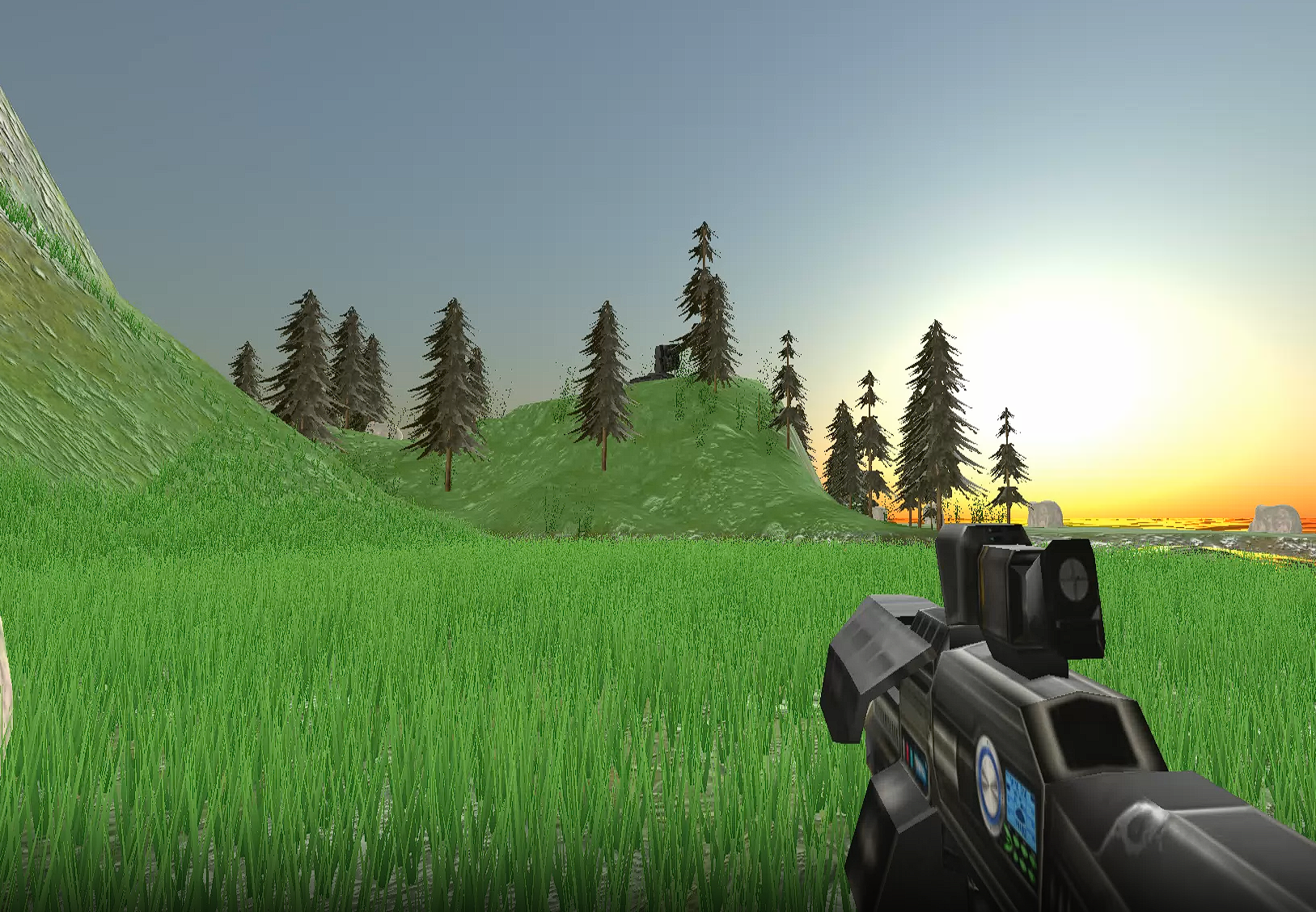
The dense grass field swaying behind this page is the live demo — tens of thousands of InstancedMesh blades in two grass types (tall field grass + short bright tufts) bending in a GLSL wind shader, with a rigged capybara grazing in it. Launch the full-screen demo and walk the capybara with WASD — the grass regenerates around it as you roam, open-world style. Drag to orbit, scroll to zoom. Scroll to keep reading.
Hides the page so you get it full screen — WASD to walk the capybara, drag to orbit, scroll to zoom, press Esc to exit.
Introduction
One of the most striking effects in a 3D game is a vast field of grass swaying in the wind. From open-world RPGs to calm exploration games, procedural grass adds instant life to a scene — but rendering thousands of blades in a browser without tanking the frame rate takes a couple of specific tricks.
In this tutorial you build an endless grass field with THREE.InstancedMesh and custom GLSL shaders. Here's why instancing matters: if each of the thousands of blades were its own mesh, the GPU would be told about them one at a time every frame — thousands of separate "draw calls" that grind the scene to a halt. InstancedMesh is one object that stamps the same blade shape in many places at once, so the whole field costs about as much as a single blade.
A custom vertex shader then bends each blade with a sine wave keyed to its world position, so a gust rolls across the whole meadow instead of every blade twitching in lockstep. A matching custom depth material makes the moving blades cast shadows that actually match the sway. Learn the pattern once and reuse it for wheat, reeds, fur, or crowds.
What you should know first: this is an intermediate build — you'll get the most from it if you've set up a basic Three.js scene (renderer, camera, a mesh in a render loop) and know roughly what a shader is. If that's new, start with Creating and Animating Simple 3D Objects or Animating 3D Objects with Shaders, then come back. No build tools — everything loads from a CDN.
Frequently Asked Questions
How do you create thousands of grass blades efficiently in Three.js?
Use THREE.InstancedMesh, which renders thousands of identical geometries in a single draw call. Define a simple blade shape (a few tapered triangles), then set each instance's position, rotation, and scale via an instance matrix. This can render tens of thousands of grass blades at 60fps because the GPU is told about the shape once and stamps it everywhere.
How does procedural infinite terrain work in Three.js?
Track the camera or player position and recycle grass instances that fall behind. When a grass blade moves outside the visible area, reposition it ahead of the player with a new random offset. The player perceives an endless field while only a fixed number of instances ever exist in memory.
How do you create realistic wind animation on grass with shaders?
Use a custom vertex shader that displaces the top of each grass blade with a sine wave based on time and the blade's world position. Multiply the displacement by the vertex height (via the UV) so the base stays planted while the tip sways. Reading the world position from the instance matrix makes the gust roll across the whole field instead of every blade moving in lockstep.
How do you make animated grass cast correct shadows?
The visible material and the shadow pass are two different shaders, so if only the visible shader bends the blades the shadows stay stiff and wrong. The fix is a custom depth material that runs the exact same wind displacement, assigned to mesh.customDepthMaterial, so the shadow a blade casts matches the shape you see swaying.
Is this tutorial free?
Yes. The grass field behind this page is a live Three.js demo, and the full single-file source is on the page. Signing in with Google to reveal the code is free — it takes one click and unlocks every free tutorial on the site.
Build grass-blade geometry from scratch with BufferGeometry — a few fanned, tapered triangles per blade.
Make two grass types (tall field grass + short bright tufts) as two InstancedMeshes for a fuller, denser look.
Render tens of thousands of blades per type, each in a single draw call, with InstancedMesh.
Write a custom GLSL vertex shader for a rolling wind wave keyed to world position.
Match the shadows to the sway with a custom customDepthMaterial.
Shade blades with a base-to-tip color gradient and simple lighting in the fragment shader.
How It Works
Blade geometry is a handful of tapered triangles fanned around a center, built once as a BufferGeometry with UVs that run 0 at the base to 1 at the tip.
One InstancedMesh stamps that blade thousands of times, each with its own position, random spin, and scale written into an instance matrix — one draw call for the whole field.
A shared uTime uniform drives a wind function that reads each blade's world position from its instance matrix and bends the tip with a sine wave, scaled by the UV height so the base stays planted.
A custom depth material runs the exact same wind function, so the shadows the blades cast match the shape you see swaying instead of staying stiff.
The fragment shader blends a dark base color to a brighter tip and adds a little directional light and ambient occlusion for depth.
The render loop advances uTime every frame so the blades and their shadows sway together.
Two grass types for a fuller field — a tall, thin, dark field grass and a shorter, wider, brighter tuft grass, each its own InstancedMesh with its own geometry and colors (the same two-layer trick Super Soldier Battle uses). Both run tens of thousands of dense blades.
A rigged capybara drives the field — WASD moves a player group, and every frame any blade of either type that falls more than half a field behind the capybara is wrapped to the far side (and the flat ground slides with it), so the dense meadow is endless and always surrounds the player, open-world style. The Walk and Idle clips crossfade through an AnimationMixer.
Sign in to unlock the code
This tutorial is 100% free — just sign in with Google to reveal the full code breakdown, the complete copy-paste source, and the one-click Launch. It takes one click and unlocks every free tutorial.
Code Breakdown
Here is the whole effect in plain English. Beginners: read the bold summaries. Developers: the notes after each explain the why and the performance choices.
1Blade geometry with base-to-tip UVs
const BLADES = 4, verts = [], uvs = [];
for (let b = 0; b < BLADES; b++) {
  const a = (b / BLADES) * Math.PI * 2;
  const c = Math.cos(a), s = Math.sin(a);
  verts.push(-0.04*c,0,-0.04*s, 0.04*c,0,0.04*s, c*0.12,0.5,s*0.12);
  // ...two more tapered triangles up to the tip at y = 1.2...
  uvs.push(0,0, 1,0, 1,0.33, /* ... */ 0,0.33, 1,0.33, 0.5,1);
}
const geo = new THREE.BufferGeometry();
geo.setAttribute('position', new THREE.Float32BufferAttribute(verts, 3));
geo.setAttribute('uv', new THREE.Float32BufferAttribute(uvs, 2));
geo.computeVertexNormals();
In plain English: one blade is a few skinny triangles fanned around a center so it reads as grass from any angle. Developer note: the UV's y runs 0 at the base to 1 at the tip — that single value is what later lets the wind shader bend only the top while the roots stay planted.
2One InstancedMesh for the whole field
const COUNT = 6000;
const mesh = new THREE.InstancedMesh(geo, mat, COUNT);
mesh.castShadow = true;
mesh.customDepthMaterial = depthMat;   // shadows use the same wind (step 4)
mesh.frustumCulled = false;
const dummy = new THREE.Object3D();
for (let i = 0; i < COUNT; i++) {
  dummy.position.set((Math.random()-0.5)*40, 0, (Math.random()-0.5)*40);
  dummy.rotation.y = Math.random() * Math.PI * 2;
  dummy.scale.set(0.8+Math.random()*0.4, 0.5+Math.random()*1.0, 0.8+Math.random()*0.4);
  dummy.updateMatrix();
  mesh.setMatrixAt(i, dummy.matrix);
}
mesh.instanceMatrix.needsUpdate = true;
In plain English: all 6,000 blades are one object. A throwaway Object3D builds each blade's position, random spin and size, and that transform is copied into the instance. Developer note: this is one draw call for the entire field. frustumCulled = false stops the mesh vanishing when its origin leaves the view, and the per-instance random scale is what keeps the field from looking like a grid.
3The wind, shared as one GLSL function
const uTime = { value: 0 };
const windGLSL = `
  vec3 applyWind(vec3 pos, vec2 uvIn, mat4 iMat, float t) {
    vec4 wp = iMat * vec4(pos, 1.0);              // blade's WORLD position
    float h = uvIn.y * uvIn.y;                    // only bend toward the tip
    float w = sin(wp.x*0.05 + wp.z*0.04 + t*1.2)*0.5+0.5;
    pos.x += w * h * 0.3;
    pos.y -= abs(w * h) * 0.1;
    return pos;
  }`;
In plain English: each blade leans with a sine wave; the lean grows toward the tip and depends on where the blade stands, so a gust rolls across the meadow. Developer note: squaring the UV height (h = uvIn.y*uvIn.y) keeps the base rigid; feeding the world position (iMat * pos) into the sine is what makes neighboring blades move together instead of each on its own clock.
In plain English: shadows are drawn by a separate pass, so unless it bends the blades too, the shadows stay stiff and wrong. Developer note: the shadow pass uses its own material. Assigning a customDepthMaterial that calls the identical applyWind() and sharing the one uTime uniform is what makes the cast shadow match the swaying blade exactly.
5The loop: advance time, orbit, render
const clock = new THREE.Clock();
function animate() {
  requestAnimationFrame(animate);
  uTime.value = clock.getElapsedTime();   // drives BOTH shaders
  controls.update();                      // orbit + wheel zoom
  renderer.render(scene, camera);
}
animate();
In plain English: every frame bumps the shared clock, so the grass and its shadows animate in sync. Developer note: because both materials read the same uTime uniform object, you update it once and both the visible blades and the depth/shadow pass stay perfectly matched. For an infinite field, recycle blades ahead of the camera as it moves.
The Full Code
Copy this into a file named index.html and open it in any modern browser — or hit Launch. Three.js and the rigged capybara GLB load from a CDN, so it runs as-is. WASD / arrow keys walk the capybara, drag to orbit, scroll to zoom.
<!DOCTYPE html>
<html lang="en">
<head>
<meta charset="UTF-8" />
<meta name="viewport" content="width=device-width, initial-scale=1" />
<title>Endless Grass + Capybara (WASD)</title>
<style>
html, body { margin: 0; height: 100%; overflow: hidden; background: #5dadec; font-family: system-ui, sans-serif; }
canvas { display: block; }
#hint { position: fixed; left: 50%; bottom: 18px; transform: translateX(-50%); background: rgba(0,0,0,0.55);
color: #eafbe7; padding: 8px 16px; border-radius: 10px; font-size: 13px; pointer-events: none; }
</style>
<script async src="https://unpkg.com/es-module-shims@1.8.0/dist/es-module-shims.js"></script>
<script type="importmap">
{
"imports": {
"three": "https://unpkg.com/three@0.160.0/build/three.module.js",
"three/addons/": "https://unpkg.com/three@0.160.0/examples/jsm/"
}
}
</script>
</head>
<body>
<div id="hint">WASD / arrow keys to walk · drag to orbit · scroll to zoom</div>
<script type="module">
import * as THREE from "three";
import { OrbitControls } from "three/addons/controls/OrbitControls.js";
import { GLTFLoader } from "three/addons/loaders/GLTFLoader.js";
const scene = new THREE.Scene();
scene.background = new THREE.Color(0x5dadec);
scene.fog = new THREE.Fog(0x5dadec, 18, 34);
const camera = new THREE.PerspectiveCamera(70, innerWidth / innerHeight, 0.1, 200);
camera.position.set(0, 4, 9);
const renderer = new THREE.WebGLRenderer({ antialias: true });
renderer.setSize(innerWidth, innerHeight);
renderer.setPixelRatio(Math.min(devicePixelRatio, 1.5));
renderer.shadowMap.enabled = true;
renderer.shadowMap.type = THREE.PCFSoftShadowMap;
document.body.appendChild(renderer.domElement);
const controls = new OrbitControls(camera, renderer.domElement);
controls.enableDamping = true;
controls.enablePan = false;
controls.minDistance = 4;
controls.maxDistance = 26;
controls.maxPolarAngle = Math.PI / 2.05;
scene.add(new THREE.HemisphereLight(0xbfe3ff, 0x1a3a10, 0.9));
const sun = new THREE.DirectionalLight(0xfff2d6, 1.6);
sun.position.set(-12, 16, 6);
sun.castShadow = true;
sun.shadow.mapSize.set(2048, 2048);
sun.shadow.camera.near = 1; sun.shadow.camera.far = 80;
sun.shadow.camera.left = -40; sun.shadow.camera.right = 40;
sun.shadow.camera.top = 40; sun.shadow.camera.bottom = -40;
sun.shadow.bias = -0.0004;
scene.add(sun);
const ground = new THREE.Mesh(
new THREE.PlaneGeometry(400, 400),
new THREE.MeshStandardMaterial({ color: 0x1a3a10, roughness: 0.95, metalness: 0.0 })
);
ground.rotation.x = -Math.PI / 2;
ground.receiveShadow = true;
scene.add(ground);
const uTime = { value: 0 };
// Shared wind GLSL (visible + depth material so shadows match the sway).
const windGLSL = `
vec3 applyWind(vec3 pos, vec2 uvIn, mat4 iMat, float t) {
vec4 wp = iMat * vec4(pos, 1.0);
float h = uvIn.y * uvIn.y;
float w = sin(wp.x * 0.05 + wp.z * 0.04 + t * 1.2) * 0.5 + 0.5;
pos.x += w * h * 0.3;
pos.y -= abs(w * h) * 0.1;
return pos;
}`;
// Build a fanned grass-blade geometry. Two "types" use different sizes so one
// reads as tall field grass and the other as short, wide tufts.
function makeBladeGeo(bladeWidth, bladeHeight, bladeMidHeight, spread) {
const numBlades = 4, verts = [], uvs = [];
for (let b = 0; b < numBlades; b++) {
const a = (b / numBlades) * Math.PI * 2, cos = Math.cos(a), sin = Math.sin(a);
const midX = cos * spread * 0.43, midZ = sin * spread * 0.43;
const tipX = cos * spread, tipZ = sin * spread;
verts.push(
-bladeWidth / 2 * cos, 0, -bladeWidth / 2 * sin,
bladeWidth / 2 * cos, 0, bladeWidth / 2 * sin,
midX + bladeWidth / 4 * cos, bladeMidHeight, midZ + bladeWidth / 4 * sin
);
verts.push(
-bladeWidth / 2 * cos, 0, -bladeWidth / 2 * sin,
midX + bladeWidth / 4 * cos, bladeMidHeight, midZ + bladeWidth / 4 * sin,
midX - bladeWidth / 4 * cos, bladeMidHeight, midZ - bladeWidth / 4 * sin
);
verts.push(
midX - bladeWidth / 4 * cos, bladeMidHeight, midZ - bladeWidth / 4 * sin,
midX + bladeWidth / 4 * cos, bladeMidHeight, midZ + bladeWidth / 4 * sin,
tipX, bladeHeight, tipZ
);
uvs.push(0, 0, 1, 0, 1, 0.33, 0, 0, 1, 0.33, 0, 0.33, 0, 0.33, 1, 0.33, 0.5, 1);
}
const g = new THREE.BufferGeometry();
g.setAttribute("position", new THREE.Float32BufferAttribute(verts, 3));
g.setAttribute("uv", new THREE.Float32BufferAttribute(uvs, 2));
g.computeVertexNormals();
return g;
}
function makeGrassMaterials(baseHex, tipHex) {
const mat = new THREE.ShaderMaterial({
uniforms: {
uTime: uTime,
uBase: { value: new THREE.Color(baseHex) },
uTip: { value: new THREE.Color(tipHex) },
uSunDir: { value: new THREE.Vector3(-12, 16, 6).normalize() },
uSunColor: { value: new THREE.Color(0xfff2d6) }
},
vertexShader: `
uniform float uTime; varying vec2 vUv; varying vec3 vNormal;
${windGLSL}
void main() {
vUv = uv;
vec3 pos = applyWind(position, uv, instanceMatrix, uTime);
vNormal = normalize(mat3(instanceMatrix) * normal);
gl_Position = projectionMatrix * modelViewMatrix * instanceMatrix * vec4(pos, 1.0);
}`,
fragmentShader: `
uniform vec3 uBase; uniform vec3 uTip; uniform vec3 uSunDir; uniform vec3 uSunColor;
varying vec2 vUv; varying vec3 vNormal;
void main() {
vec3 col = mix(uBase, uTip, vUv.y);
float diff = abs(dot(normalize(vNormal), uSunDir));
float ao = mix(0.55, 1.0, vUv.y);
vec3 lit = col * ao * (0.5 + 0.9 * diff) + uSunColor * diff * 0.12 * vUv.y;
gl_FragColor = vec4(lit, 1.0);
}`,
side: THREE.DoubleSide
});
const depth = new THREE.ShaderMaterial({
uniforms: { uTime: uTime },
vertexShader: `
uniform float uTime; varying vec2 vHighPrec;
${windGLSL}
void main() {
vec3 pos = applyWind(position, uv, instanceMatrix, uTime);
vec4 mvPos = modelViewMatrix * instanceMatrix * vec4(pos, 1.0);
gl_Position = projectionMatrix * mvPos;
vHighPrec = gl_Position.zw;
}`,
fragmentShader: `
#include <packing>
varying vec2 vHighPrec;
void main() { gl_FragColor = packDepthToRGBA(0.5 * vHighPrec.x / vHighPrec.y + 0.5); }`,
side: THREE.DoubleSide
});
return { mat, depth };
}
// Grass fills a CIRCLE of radius GRASS_R around the player. Blades still wrap on
// a square tile (FIELD) so the field stays endless and cheap; blades outside the
// circle are hidden and the fog fades the rim into the sky, so there is no hard
// edge. Larger circle, SAME density (counts scale with area).
const GRASS_R = 30, FIELD = GRASS_R * 2, GRASS_R2 = GRASS_R * GRASS_R;
function makeLayer(geo, matPair, count, sMin, sMax) {
const mesh = new THREE.InstancedMesh(geo, matPair.mat, count);
mesh.castShadow = true;
mesh.customDepthMaterial = matPair.depth;
mesh.frustumCulled = false;
scene.add(mesh);
const data = [];
const dummy = new THREE.Object3D(), _e = new THREE.Euler(), _q = new THREE.Quaternion();
for (let i = 0; i < count; i++) {
data.push({
x: (Math.random() - 0.5) * FIELD,
z: (Math.random() - 0.5) * FIELD,
ry: Math.random() * Math.PI * 2,
s: sMin + Math.random() * (sMax - sMin),
sy: 0.85 + Math.random() * 0.3, // baked height jitter (so pressing doesn't twitch)
press: 0, tdir: 0, // press 0..1 = how flattened; tdir = lay direction
cx: 0, cz: 0 // offset from circle center (player), set each frame
});
}
function write(i) {
const b = data[i];
// Hide blades outside the circle so the patch reads round.
if (b.cx * b.cx + b.cz * b.cz > GRASS_R2) { dummy.scale.set(0, 0, 0); dummy.position.set(b.x, -99, b.z); dummy.updateMatrix(); mesh.setMatrixAt(i, dummy.matrix); return; }
dummy.position.set(b.x, 0, b.z);
// press lays the blade DOWN away from the capybara (tilt + shorten) so it
// leaves a trampled trail instead of spiking through the model.
const p = b.press, tilt = p * 1.5;
_e.set(Math.sin(b.tdir) * tilt, b.ry, Math.cos(b.tdir) * tilt);
_q.setFromEuler(_e);
dummy.quaternion.copy(_q);
dummy.scale.set(b.s, b.s * b.sy * (1 - p * 0.55), b.s);
dummy.updateMatrix();
mesh.setMatrixAt(i, dummy.matrix);
}
for (let i = 0; i < count; i++) { data[i].cx = data[i].x; data[i].cz = data[i].z; write(i); }
mesh.instanceMatrix.needsUpdate = true;
return { mesh, data, write, count };
}
// Type A: tall thin field grass (dense). Type B: short wide bright tufts (dense).
// Counts scale with the circle area to keep the SAME density.
const tallGeo = makeBladeGeo(0.16, 1.8, 0.6, 0.35);
const tuftGeo = makeBladeGeo(0.26, 0.7, 0.3, 0.5);
const tall = makeLayer(tallGeo, makeGrassMaterials(0x1a4010, 0x4a9030), 24000, 0.8, 1.3);
const tuft = makeLayer(tuftGeo, makeGrassMaterials(0x2b5a16, 0x8fc24a), 16000, 0.9, 1.5);
const layers = [tall, tuft];
// Trample: blades within CLEAR_R of the capybara lay down (press -> 1) and
// spring back up (press -> 0) once it moves away, leaving a flattened trail.
// Press holds near-full most of the way out and only softens in the last 20%,
// so no blades poke through at the fringe of the clearing.
const CLEAR_R = 2.4, CLEAR_R2 = CLEAR_R * CLEAR_R;
function recycleLayers(px, pz, dt) {
const half = FIELD / 2;
const ease = Math.min(1, dt * 6);
for (const L of layers) {
let dirty = false;
for (let i = 0; i < L.count; i++) {
const b = L.data[i];
let changed = false;
if (b.x - px > half) { b.x -= FIELD; changed = true; } else if (px - b.x > half) { b.x += FIELD; changed = true; }
if (b.z - pz > half) { b.z -= FIELD; changed = true; } else if (pz - b.z > half) { b.z += FIELD; changed = true; }
const dx = b.x - px, dz = b.z - pz, d2 = dx * dx + dz * dz;
// circle cull: redraw when a blade crosses the circle edge
const wasIn = b.cx * b.cx + b.cz * b.cz <= GRASS_R2;
const nowIn = d2 <= GRASS_R2;
b.cx = dx; b.cz = dz;
if (wasIn !== nowIn) changed = true;
let target = 0;
if (d2 < CLEAR_R2) {
const dn = Math.sqrt(d2) / CLEAR_R;
target = dn < 0.8 ? 1 : 1 - (dn - 0.8) / 0.2;
b.tdir = Math.atan2(dx, dz);
}
const np = b.press + (target - b.press) * ease;
if (changed || Math.abs(np - b.press) > 0.004) { b.press = np; L.write(i); dirty = true; }
}
if (dirty) L.mesh.instanceMatrix.needsUpdate = true;
}
}
// ---- Capybara (rigged GLB) + WASD movement ----
const player = new THREE.Group();
scene.add(player);
let mixer = null, actions = {}, current = null, walking = false;
function play(name, fade = 0.25) {
const next = actions[name];
if (!next || current === next) return;
next.reset().fadeIn(fade).play();
if (current) current.fadeOut(fade);
current = next;
}
new GLTFLoader().load(
"https://www.shanebrumback.com/models/capybara_rigged.glb",
(gltf) => {
const capy = gltf.scene;
capy.traverse((o) => { if (o.isMesh) { o.castShadow = true; o.frustumCulled = false; } });
player.add(capy);
mixer = new THREE.AnimationMixer(capy);
for (const clip of gltf.animations) actions[clip.name] = mixer.clipAction(clip);
if (actions.Idle) { current = actions.Idle; current.play(); }
},
undefined,
() => { /* load error: the grass + ground still run */ }
);
const keys = {};
addEventListener("keydown", (e) => {
const k = e.key.toLowerCase();
if (["w", "a", "s", "d", "arrowup", "arrowdown", "arrowleft", "arrowright"].includes(k)) { keys[k] = true; e.preventDefault(); }
});
addEventListener("keyup", (e) => { keys[e.key.toLowerCase()] = false; });
const SPEED = 6;
const _tmp = new THREE.Vector3();
const clock = new THREE.Clock();
function frame() {
requestAnimationFrame(frame);
const dt = Math.min(clock.getDelta(), 0.05);
uTime.value = clock.elapsedTime;
let ix = 0, iz = 0;
if (keys["w"] || keys["arrowup"]) iz -= 1;
if (keys["s"] || keys["arrowdown"]) iz += 1;
if (keys["a"] || keys["arrowleft"]) ix -= 1;
if (keys["d"] || keys["arrowright"]) ix += 1;
const moving = ix !== 0 || iz !== 0;
if (moving) {
const camYaw = Math.atan2(camera.position.x - player.position.x, camera.position.z - player.position.z);
const len = Math.hypot(ix, iz); ix /= len; iz /= len;
const sinY = Math.sin(camYaw), cosY = Math.cos(camYaw);
const dx = ix * cosY - iz * sinY, dz = ix * sinY + iz * cosY;
player.position.x += dx * SPEED * dt;
player.position.z += dz * SPEED * dt;
const heading = Math.atan2(dx, dz);
player.rotation.y += ((heading - player.rotation.y + Math.PI * 3) % (Math.PI * 2) - Math.PI) * Math.min(1, dt * 10);
if (!walking && actions.Walk) { play("Walk"); walking = true; }
} else if (walking && actions.Idle) {
play("Idle"); walking = false;
}
const px = player.position.x, pz = player.position.z;
ground.position.x = px; ground.position.z = pz;
recycleLayers(px, pz, dt);
sun.position.set(px - 12, 16, pz + 6);
sun.target.position.set(px, 0, pz); sun.target.updateMatrixWorld();
if (mixer) mixer.update(dt);
controls.target.lerp(_tmp.set(px, 1.0, pz), Math.min(1, dt * 6));
controls.update();
renderer.render(scene, camera);
}
addEventListener("resize", () => {
camera.aspect = innerWidth / innerHeight;
camera.updateProjectionMatrix();
renderer.setSize(innerWidth, innerHeight);
});
frame();
</script>
</body>
</html>
What To Try Next
Recycle blades ahead of the camera as it moves to turn the fixed patch into a truly endless field that follows the player.
Add a second, higher-frequency sine wave to the wind for gusty, less uniform motion.
Tint the base-to-tip gradient toward yellow for wheat, or blue-green for reeds.
Scatter flowers or rocks as extra InstancedMeshes using the same recycle trick.
Drive the wind strength from a game value — weather, a passing vehicle, an explosion shockwave.