Member-Only 3D Game Studio · Live V1
INDIE FORGE STUDIO LIVE CODE EDITOR
MOD, TUNE & PUBLISH 3D GAMES LIVE
Turn any Indie Forge tutorial into your own playable 3D browser game — edit real Three.js and Rapier physics code side-by-side with the running scene, save your builds to the cloud, and publish a shareable link.
By Shane Brumback ·
What Is the Indie Forge Studio Live Code Editor?
Short answer: The Indie Forge Studio Live Code Editor is a browser-based 3D game studio built for paid Indie Forge Studio members. Instead of downloading ZIP files or fighting local build tools, you open a real playable Three.js game right in your browser, tweak physics and visuals with live sliders or real code, cloud-save up to 25 custom projects, and publish your own playable game URL at play.indieforgestudio.com/g/your-slug.
Why We Built a Browser-Native 3D Code Editor
Reading a Three.js tutorial is one thing; actually grabbing the steering wheel, doubling the gravity, swapping the sky to midnight neon, and seeing your own version run in two seconds is how game dev clicks. Most beginners lose half an evening just installing Node, configuring bundlers, and fixing import paths before they ever render a single mesh.
The Live Code Editor removes that entire wall. Every scene in the editor is a clean, real, runnable Three.js (and Rapier physics where used) game paired directly with a live 3D viewport. Edit one constant or rewrite the whole loop, press Ctrl+Enter, and play your changes immediately.
Six Features Built Into Live V1
Live 3D Sandbox + Code
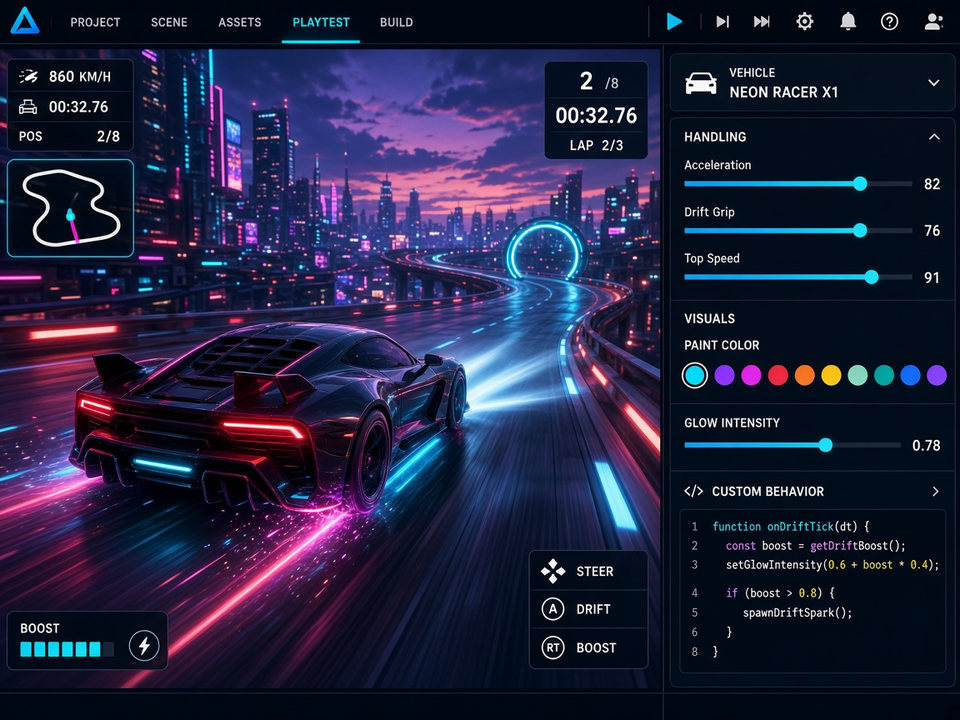
Edit step-by-step tutorial sections or the full single-file game and press Run (Ctrl+Enter) to reload your 3D scene side-by-side with zero downloads or local setup.
Quick Tune Sliders
Tweak acceleration, top speed, drift grip, sky color, fog density, glow intensity, and lighting in real time — great for dialing in game feel before diving deeper into the code.
Scene Switcher
Jump cleanly between playable Three.js scenes including the GTA-Style Car Game (Parts 1–3) and Rocket Lander, with new portrait arcade games arriving every week.
Save Up to 25 Cloud Projects
Keep up to 25 custom builds saved in your member cloud workspace so you can experiment freely, version your ideas, and reopen any project from any browser.
Publish Your Own Game
Turn a custom mod into a live web game in one click and share it at play.indieforgestudio.com/g/your-slug so friends and players can jump straight in.
Virtual Help & Guided Tour
New to the workspace? Follow the built-in interactive Guided Tour or search the in-editor Help Knowledge Base without leaving your scene.
Inside the Workspace
Whether you are tuning a space rocket thruster loop or crafting a sunset hovercraft arena, the editor keeps your 3D canvas, live sliders, and JavaScript side-by-side in one focused dark studio layout.


Playable Scenes Live Now & Rolling Out Weekly
Every scene in the Live Code Editor pairs directly with a step-by-step tutorial on shanebrumback.com/tutorials so you can learn the mechanics and immediately remix the game.
| Scene | Focus | Status | Links |
|---|---|---|---|
| Rocket Lander (Portrait 3D) | Pure Three.js gravity, thruster particles, moving pad, soft-landing math | Live Now | Open in Editor · Tutorial |
| GTA-Style Car Game (Part 1) | Rapier vehicle physics, wheel splitting, sunset city driving | Live Now | Tutorial |
| GTA-Style Car Game (Part 2) | Night lighting, volumetric street-lamp beams, headlights, lens flares | Live Now | Tutorial |
| GTA-Style Car Game (Part 3) | GPU rain streaks, wet road reflections, rippling puddles, tire spray | Live Now | Tutorial |
| Wall Flip, Balloon Guard, Knife Spin & Drift Dash | Four more distinct portrait Three.js arcade mechanics | Weekly Fridays | Rolling out starting Dec 4, 2026 |
How to Launch Your First Mod in 60 Seconds
- Sign in with Google on shanebrumback.com/membership or indieforgestudio.com and activate a Monthly or Annual membership.
- Click the glowing Live Code Editor badge in the bottom-left corner of any page — or open editor.indieforgestudio.com directly.
- Pick a scene from the Scene Switcher (try Rocket Lander or GTA Part 1), move a Quick Tune slider or edit a code constant, and hit Ctrl+Enter.
- Save your project to the cloud and hit Publish when you want a live link to share.
Frequently Asked Questions
What is the Indie Forge Studio Live Code Editor?
It is a browser-based 3D game studio at editor.indieforgestudio.com where paid Indie Forge Studio members can mod real Three.js and Rapier physics games side-by-side with a live 3D canvas, tweak Quick Tune sliders, save up to 25 cloud projects, and publish playable links.
Do I need to install Node.js, Vite, or any software first?
No. Everything runs directly in your browser with zero downloads or local tooling. Edit the code or adjust sliders and press Ctrl+Enter to test live.
Which games and tutorials are in the Scene Switcher right now?
GTA-Style Car Game Parts 1 through 3 and Rocket Lander are live right now, with Wall Flip, Balloon Guard, Knife Spin, and Drift Dash rolling out every Friday.
How many projects can I save, and how does publishing work?
You can cloud-save up to 25 custom projects under your member account and publish your build to a shareable URL at play.indieforgestudio.com/g/your-slug.
How do I unlock access to the Live Code Editor?
The Live Code Editor is included with a paid Indie Forge Studio Membership (Monthly or Annual), which also removes ads across games and unlocks premium tutorials and source code.
Is the editor beginner-friendly if I am still learning Three.js?
Yes. You can start with the interactive Guided Tour and Quick Tune sliders to see how parameters change the 3D scene immediately, then step into the JavaScript with the searchable Help KB right beside you.
Ready to Build Your Own 3D Game?
Open the Live Code Editor if you are already a member, or check the membership plans to unlock full access today.


