Super Soldier Battle Dev Log
THREE.JS SHARPEN FILTER:
CAS SHARPENING IN A REAL BROWSER SHOOTER
My game looked soft on lower render settings. A contrast adaptive sharpen pass won the detail back for almost no cost, without the halos of a plain sharpen.
By Shane Brumback · · Beginner friendly
The Three.js Sharpen Filter in One Paragraph
A Three.js sharpen filter is a post-processing shader that runs after the scene renders and boosts the difference between each pixel and its neighbors. Contrast adaptive sharpening (CAS) is the best choice for games: it reads only five pixels, sharpens soft areas more than strong edges so it avoids halos, and has a single 0 to 1 strength. Run it after anti-aliasing, ideally merged into a pass you already have.
Why Did Super Soldier Battle Look Soft?
Super Soldier Battle renders a lot: a full battle royale map, dozens of soldiers, gunships, smoke and muzzle flashes, all in a browser tab. To keep it smooth on laptops and phones, the game renders at a lower resolution on slower devices and runs anti-aliasing to clean up jagged edges. Both of those trade a little sharpness for speed.
Players noticed. Distant soldiers looked mushy, the brick and crate textures lost their detail, and the whole picture had a slightly out-of-focus look next to a native desktop game. I did not want to pay for a higher resolution, so I added a sharpen filter instead.
What Is a Three.js Sharpen Filter?
A sharpen filter is a post-processing pass: after the 3D scene is drawn into an image, a small shader runs on every pixel of that image. It looks at the pixel and its neighbors and increases the difference between them, so edges and fine texture read as crisper.
In plain words: the game takes a photo of each frame, then a tiny program makes the edges in that photo a bit stronger before you see it. Three.js does not include one out of the box. You add it as a ShaderPass on an EffectComposer, or as an effect inside the postprocessing library's EffectPass, which is what the game uses.
Unsharp Mask vs CAS: Which Sharpen Filter Should You Use?
The classic sharpen filter is an unsharp mask: blur the image, subtract the blur, add the difference back. It works, but it sharpens everything the same amount. Edges that are already strong get bright white halos, and noise gets louder.
| Unsharp mask | CAS (contrast adaptive) | |
|---|---|---|
| How much it sharpens | Same everywhere | More in soft areas, less on strong edges |
| Halos on edges | Common | Rare |
| Texture reads per pixel | 9 or more | 5 |
| Tuning | Radius and amount | One 0 to 1 slider |
| Best for | Photos | Real-time games |
CAS, contrast adaptive sharpening, comes from AMD's open FidelityFX tools. For each pixel it finds the darkest and brightest of the pixel and its four neighbors. If that range is small, the area is soft, so it sharpens hard. If the range is already big, it backs off. That one idea is why it looks clean in a game.
How I Added CAS to Super Soldier Battle
The game already runs a postprocessing EffectPass for tone mapping, color and anti-aliasing. I merged the CAS shader into that same pass instead of adding a new one, so the GPU still makes a single full-screen trip per frame. It runs after anti-aliasing, because sharpening before AA would just sharpen the jaggies that AA then smooths away.
Sharpen is a 0 to 1 setting in the graphics menu, handled by a small setSharpen() function, and saved in localStorage so it sticks between sessions. The default is gentle. Players on low render scale can turn it up to win back detail, and anyone who dislikes the look can set it to 0, which skips the work entirely.
The cost was smaller than I expected: five texture reads and a few min and max operations per pixel. I could not measure a frame-time difference on my desktop or my phone, and the picture looks noticeably clearer, especially on distant soldiers and textures.
What I Learned About Sharpening a Browser Game
Sharpening is the cheapest image quality you can buy. Rendering at 75 percent resolution and sharpening often looks better than rendering at 100 percent without it, and it runs faster.
Order matters: render, then anti-alias, then sharpen, then any film grain or UI. And keep it adaptive. The first plain sharpen I tried made muzzle flashes and the sky edge glow with ugly halos. CAS fixed that without any per-scene tuning.
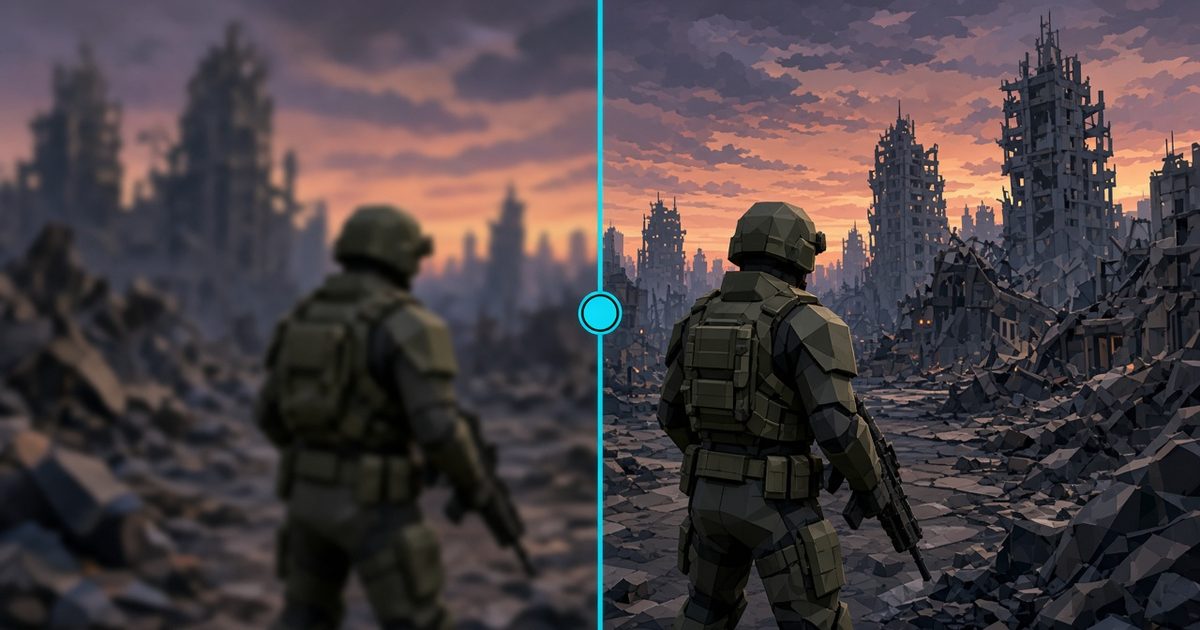
You can see the same split-screen comparison running behind this page: soft on the left of the cyan line, CAS on the right.
Build a Three.js CAS Sharpen Pass Yourself
I turned this into a premium step-by-step tutorial with a live demo: a textured yard rendered at a lower resolution, a full CAS shader, a draggable before-and-after split line and sliders for sharpness and render scale. Read the Three.js CAS sharpen pass tutorial. For another post-processing effect, see the Three.js bloom glow tutorial.
Then jump into Super Soldier Battle, open the graphics menu and slide Sharpen from 0 to 1. If you are building your own Three.js game and want help with rendering or performance, contact me.
Frequently Asked Questions
What is a sharpen filter in Three.js?
It is a post-processing pass that runs after the scene renders. It reads each pixel and its neighbors and pushes edges apart so the image looks crisper. Three.js does not ship one by default, so you add it as a ShaderPass or inside the postprocessing EffectPass.
What is CAS sharpening?
CAS stands for contrast adaptive sharpening, an open technique from AMD FidelityFX. It sharpens more in flat, soft areas and less where contrast is already high, so it avoids the bright halos and noise that a plain unsharp mask creates.
Why does my Three.js game look blurry?
Usually because of a lower render resolution or pixel ratio for speed, FXAA or SMAA anti-aliasing softening edges, or texture mipmaps at a distance. A light sharpen pass after anti-aliasing brings the detail back for almost no cost.
How expensive is a CAS sharpen pass?
Very cheap: five texture reads per pixel and a little math. Merged into an existing EffectPass it adds no extra full-screen pass. In Super Soldier Battle I could not measure a frame-time difference on desktop or phone.
Can players turn sharpening off in Super Soldier Battle?
Yes. Sharpen is a 0 to 1 setting in the graphics menu and it is saved in your browser, so it stays the way you like it next time you play.
Play Super Soldier Battle
Play Super Soldier Battle free in your browser and try the Sharpen slider in the graphics menu.
Building a Three.js game and need help with rendering or performance? I'm available for freelance and contract work: contact me.