Super Soldier Battle Dev Log · Premium Tutorial
THREE.JS FPS CONTROLS TUTORIAL:
POINTER LOCK DONE RIGHT
By Shane Brumback · · Intermediate Three.js tutorial · about 50 minutes
Build first-person controls that never flip, never eat your first shot, never get stuck firing and keep your jump arc, plus a rifle with muzzle flash and impact sparks, and touch controls for phones.
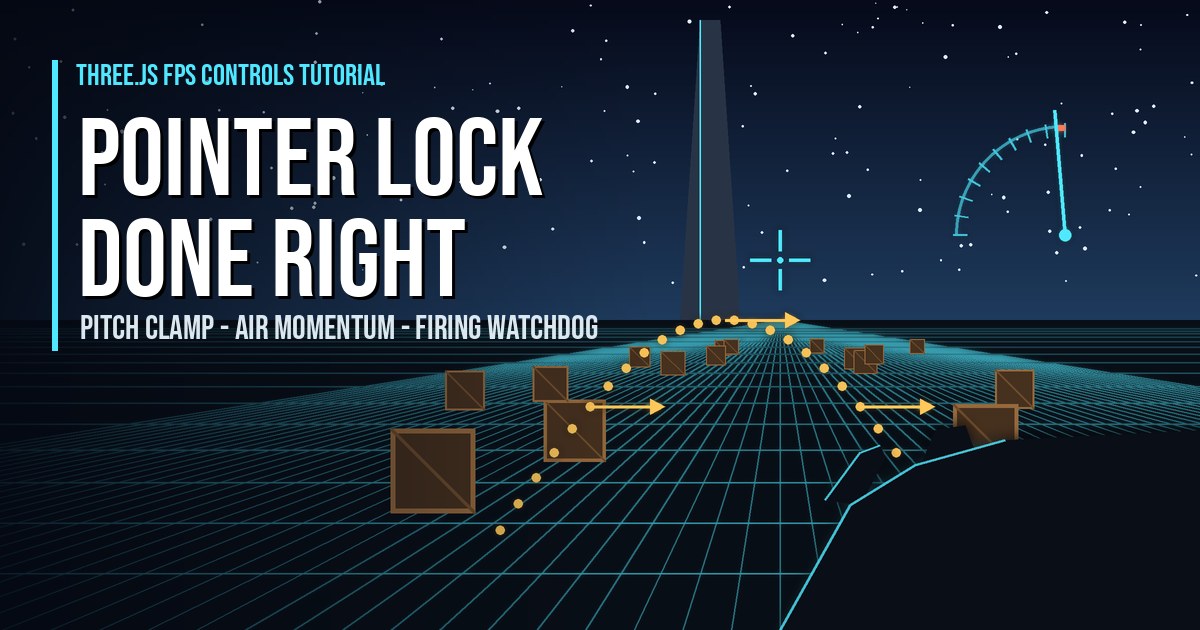
SEE IT LIVE
The greybox test map walking past behind this page is a live run of this tutorial's scene: grid-textured floors and walls, ramps, stairs, cover, the target range and the tall pillar you look up at. Launch the full-screen demo, click to lock the mouse, then walk it with WASD, look with the mouse, click to fire and jump with Space.
Best on desktop with mouse and keyboard.
What Are Three.js FPS Controls? (Quick Answer)
This tutorial builds production-ready Three.js FPS controls on PointerLockControls: a pitch clamp keeps the camera 0.08 radians away from straight up and down so it never flips, an isLocked guard stops the lock-acquiring click from firing, a per-frame watchdog keeps the trigger in sync with the real mouse button, and the movement loop keeps horizontal momentum while airborne so jumps finish their arc. It adds a primitive-built rifle with pooled firing effects, touch controls for phones and a greybox test map with ramps, stairs and a target range.
Introduction
Three.js FPS controls look easy: drop in PointerLockControls, add WASD, done. Then real players show up. They look straight up and the camera flips. Their first click after Play fires a shot they didn't mean. They alt-tab and come back with the gun still firing. They let go of W mid-jump and drop like a stone. In this premium tutorial we build first-person controls that handle all four, using the exact fixes I shipped in my browser shooter Super Soldier Battle. The story behind them is in the dev log article.
In plain words: we build the controls of a first-person shooter (look with the mouse, move with the keys, jump and fire) and fix four problems that only show up when real people play. In a game this matters because controls that flip the camera, miss the first click, keep firing or lose jump speed make the game feel broken, even if everything else is good.
A few words you will see a lot, explained once:
- Pointer lock: a browser feature that hides the mouse cursor and keeps it inside the game, so moving the mouse turns the camera without the cursor hitting the screen edge.
- PointerLockControls: the Three.js add-on that uses pointer lock to turn mouse movement into camera rotation.
- Yaw and pitch: yaw is turning left and right; pitch is looking up and down.
- HUD: the heads-up display, the text overlay that shows live numbers while you play.
- Frame / fps: the game redraws the screen many times a second; each redraw is a frame, and fps is frames per second.
- Watchdog: a small check that runs every frame to catch and fix a stuck state.
A full-screen training range: a grid floor, 40 crates to shoot, and a 220-unit tower that gives you a reason to look straight up. Click PLAY to lock the mouse, then walk, sprint, jump and hold the left button to fire. A live HUD shows your angle from straight up, your horizontal speed, the height of your last jump, the trigger and raw button state, and how many times the firing watchdog had to step in.
Two keys let you feel each fix by turning it off. C toggles the pitch clamp. M toggles air momentum. Try a sprint jump with M off and let go of W in the air: the arc dies instantly. Turn it back on and the same jump carries you forward.
If you have never used pointer lock before, start with my free Three.js pointer lock controls basics and keyboard inputs for first person games. This tutorial does not repeat them. It picks up where they stop: the edge cases that only show up when people actually play.
New in this version: a first-person rifle built from Three.js primitives, with sway, walk bob and recoil; pooled firing effects (muzzle flash, impact sparks, decals and screen shake); crates that pop for points; touch controls so the demo also plays on a phone held sideways; and an Unreal-style greybox test map with grid-textured floors and walls, ramps, stairs, platforms, cover walls and a target range lane, all drawn in code.
Three.js PointerLockControls: Basic Setup vs This Tutorial
| Basic pointer lock setup | This tutorial (same as Super Soldier Battle) | |
|---|---|---|
| Looking straight up or down | Can reach the pole, camera may flip | Clamped 0.08 rad from each pole |
| Click that locks the pointer | Also fires a shot | Ignored with an isLocked guard |
| Lost mouseup (Esc, alt-tab) | Gun keeps firing | Per-frame watchdog fixes it |
| Release W in mid-air | Forward speed drops to zero | Momentum carries the arc |
| Jump physics | Often per-frame, speed depends on FPS | Scaled by delta, same arc at 30 or 144 fps |
| Frame hitch | Can teleport the player | Delta capped at 0.05 s |
| Sprint | Often 1.5x, hard to feel | 165 vs 75, about 2.2x |
What You'll Learn
- How to stop a Three.js FPS camera flipping with
minPolarAngleandmaxPolarAngle - How to ignore the pointer lock first click
- How a per-frame watchdog fixes a gun that keeps firing
- How to keep jump momentum in a Three.js FPS
- How to build a Three.js FPS gun with muzzle flash and impact sparks, with no per-shot allocations
- How to add Three.js touch controls: joystick, drag to look and a fire button
- How to build an Unreal-style greybox test map in Three.js with procedural grid textures, ramps and stairs
Prerequisites
- The free Three.js pointer lock controls basics and keyboard inputs for Three.js first person games
- A desktop browser with mouse and keyboard (or a phone in landscape for the touch controls)
- A local static web server and three.js r160 via an importmap (shown in the full code)
Frequently Asked Questions
How do I stop the Three.js FPS camera flipping when I look straight up?
Set controls.minPolarAngle and controls.maxPolarAngle on PointerLockControls so the view can never reach the exact poles. A margin of 0.08 radians, about 4.6 degrees, is enough: minPolarAngle = 0.08 and maxPolarAngle = Math.PI - 0.08. Players still look almost straight up and down, but the camera never hits the singular point where it can flip.
Why does my first click after pointer lock fire a shot?
The click that calls controls.lock() also reaches your mousedown handler. Check controls.isLocked at the top of the handler and return if it is not true, then clear your trigger state inside the lock event. The lock-acquiring click is then ignored and the next real click fires.
Why does my gun keep firing after I let go of the mouse?
A mouseup was lost, usually during an Escape, alt-tab or a pointer lock change. Track the raw button state separately from your trigger flag, and run a small watchdog every frame that copies the raw state into the trigger and clears everything when the pointer is not locked.
How do I keep momentum when jumping in a Three.js FPS?
Only zero horizontal velocity on key release when the player is on the ground. While a jump is in progress, skip the reset so the velocity you had at take-off carries through the arc. Keys pressed in the air still steer, and landing goes back to instant stops.
Should I use PointerLockControls or FirstPersonControls for an FPS game?
PointerLockControls. It hides the cursor and gives unlimited mouse movement, which is what players expect from a shooter. FirstPersonControls steers by cursor position on screen, which suits fly-throughs and demos, not aiming.
Do these Three.js FPS controls work on mobile?
No. Pointer lock needs a mouse, so this demo is for desktop browsers. On phones and tablets you need touch controls, such as a virtual joystick for movement and drag-to-look, which is a separate system.
How It Works
- Create PointerLockControls with a pitch clamp — In plain words: we stop the camera from reaching exactly straight up or straight down, where it can flip. Create the controls and set minPolarAngle to 0.08 and maxPolarAngle to Math.PI - 0.08 so the camera never reaches the poles.
- Handle the lock and unlock lifecycle — In plain words: we listen for the moment the mouse gets locked or released, and reset the controls each time. Lock on a Play click (or switch on touch controls), hide the overlay on lock, show it on unlock, and clear all trigger state in both events.
- Guard the mouse handler — In plain words: we make sure the click that starts the game does not also fire a shot. Return early from mousedown when the pointer is not locked, and track the raw button separately from the trigger.
- Add a per-frame firing watchdog — In plain words: every frame we compare "is the gun firing?" with "is the button really down?" and fix any mismatch. Each frame, copy the raw button state into the trigger and clear everything while input is not active.
- Move with walk, sprint and air momentum — In plain words: we turn the held keys into walking and sprinting speed, and keep your speed while you are in the air. Apply damping and speed while keys are held, stop instantly on the ground, and keep momentum while airborne.
- Jump with frame-rate independent gravity — In plain words: Space launches you up, gravity pulls you down, and the jump looks the same on slow and fast computers. Launch with 0.8, subtract 0.045 gravity scaled by delta times 60, and land on the ground height.
- Run one loop in a fixed order — In plain words: every frame runs the same steps in the same order, so input, movement and firing never disagree. Cap delta, run the watchdog, then movement, then firing, then effects, then render with a one-frame shake.
- Build a first-person gun from primitives — In plain words: we build a rifle out of simple shapes and glue it to the camera. Group boxes and cylinders into a rifle, add it to the camera, and mark the muzzle for the flash.
- Add pooled firing VFX — In plain words: every shot shows a flash, a bullet trail, sparks and a scorch mark, with no new objects per shot. Create sparks and decals once, recycle them in a ring, and add muzzle flash, recoil, screen shake and crates that pop for points.
- Add touch controls for mobile — In plain words: on a phone the left thumb moves, the right thumb looks, and big buttons fire and jump. Map a joystick to the movement flags, drag to look with the same pitch clamp, add fire and jump buttons, and ask portrait users to rotate.
- Build an Unreal-style greybox test map — In plain words: we build a grey grid test level, like the ones game studios use before any art exists, to try every control on. Draw grid dev textures on a canvas, build floors, walls, ramps, stairs, platforms, cover and a range lane from boxes, skip shadows on phones, and ray-cast down to stand on ramps and stairs.
That's the shape of the build. The detailed code breakdown and the full copy-paste file are below — members unlock them (become a member to get every premium tutorial and the source code).
How To Use It
- Desktop. Click PLAY to lock the mouse. WASD moves, Shift sprints, Space jumps, hold the left button to fire, Esc pauses.
- Feel each fix.
Ctoggles the pitch clamp andMtoggles air momentum. Try a sprint jump with M off and let go of W in the air. - Phone or tablet. Hold it sideways (portrait shows a rotate note), tap PLAY, move with the left joystick, drag the right side to look and hold FIRE.
- Score. Each crate takes three hits, pops for 10 points and respawns somewhere else.
READ THE FREE ARTICLE
The dev log explains the four bugs behind this code, how players found them in Super Soldier Battle, and why small control fixes matter so much. It's free to read.
Read the FPS Controls Article
Taking Three.js FPS Controls Further
- Crouch and slide. Lower
EYEsmoothly while Ctrl is held and reuse the air momentum rule for a short slide. - Recoil without breaking the clamp. Add a small random pitch and yaw jitter after
controlsupdates, never touch roll, and let it decay each frame. - Mobile. Pointer lock is desktop only. Pair these rules with a touch joystick, like my mobile responsive character controller.
- A full game loop. Drop these controls into the Three.js first person shooter starter and add enemies.
- See it in a real battle. Every fix here is live in Super Soldier Battle.
Play It and Keep Learning
Every fix in this tutorial is live in Super Soldier Battle, free in your browser. Look straight up at a gunship, sprint-jump off a ridge and see how it feels.
Need Three.js game controls, rendering or performance work? I take freelance and contract work: contact me.
Play Game