To draw dozens of fires in Three.js without wrecking your frame rate, pack every fire's particles into one THREE.Points geometry per blend mode, animate each particle in the vertex shader from a time uniform, and cull far fires yourself. This tutorial pulls that pattern from Super Soldier Battle's real fire module.
Vertex-shader particles, per-fire distance fade, your own frustum test, and a glow sprite instead of PointLights — the ideas that make the burning ruins cheap, simplified so you can drop them into your own scene.
SEE IT LIVE
The flames drifting behind this page are a live run of this exact two-draw-call particle system. Click Live Demo to bring them forward and orbit the fire yourself — or drop into Super Soldier Battle and see them on the burning ruins and gunship wrecks. Both are free and run right in your browser, no download.
Live Demo runs the real fire module right here — drag to orbit, then click Done to keep reading.
Introduction
Super Soldier Battle's ruins and crashed gunship wrecks now burn with flames, embers, a warm glow and smoke. The effect is adapted from my campfire tutorial, but the campfire is built for a single fire. A multiplayer map needs lots of fires at once without hurting the frame rate.
The game's fire module (module/ssb-ruin-fire.js) solves this with a few rules: all fires in a set share two THREE.Points draw calls (flames, embers and glow in one additive call; smoke in a second normal-blended call), every particle is simulated in the vertex shader from a time uniform and per-particle seeds, there are no PointLights, and far fires are faded and culled per fire. Because the flame atlas is painted at startup, the module ships with zero texture bytes.
What you should know first: this is an intermediate build. You'll get the most out of it if you're comfortable with the Three.js basics (scene, camera, BufferGeometry) and some GLSL. The game runs on Three.js r128, and everything below works there; the runnable example uses a current CDN build.
What You'll Learn
Packing many fires into one BufferGeometry, with one vertex per particle and random seeds as attributes
Looping particle lifetimes in GLSL with fract(), and re-rolling randomness on every cycle
Fading and hard-culling far particles inside the vertex shader
Replacing PointLights with an additive glow sprite
Hiding the whole system with your own per-fire frustum test
Placing fires on a mesh surface with a one-time downward raycast, and guarding against NaN positions
Prerequisites
Comfortable with Three.js basics (scene, camera, BufferGeometry) and some GLSL. The game runs on Three.js r128 and everything below works there; the excerpts are simplified from the real module and variable names follow the game code. The runnable example uses a current CDN build.
Frequently Asked Questions
How do I render lots of fires in Three.js without lots of draw calls?
Put every fire's particles into one THREE.Points geometry per blend mode. Super Soldier Battle draws all its ruin fires in 2 draw calls: one additive call for flames, embers and glow, and one normal-blended call for smoke.
Can particles be animated entirely on the GPU in Three.js?
Yes. Give each particle random seeds as attributes and compute its position in the vertex shader from a time uniform, looping its lifetime with fract(). The CPU only updates uniforms each frame.
Why set frustumCulled to false on a particle system?
Because one geometry that spans the whole map has a bounding sphere that's almost always on screen, so built-in culling rarely helps. Test each fire's small sphere against the frustum yourself, and hide the objects when none are visible.
Should I use a PointLight for every fire?
Usually not in a large scene, because extra lights make lit materials more expensive. An additive glow sprite per fire, drawn in the same call as the flames, gives the warm look with no light cost.
Why do my particles sometimes stretch across the whole screen?
A NaN or huge position value is a common cause. Super Soldier Battle had exactly this with a wreck fire, and now checks every fire position with isFinite and falls back to a safe height when a raycast misses.
How It Works
One geometry holds every fire's particles — one vertex per particle, with random seeds, a type and a per-fire scale as attributes, written once.
The vertex shader simulates everything from a single uTime uniform, looping each particle's life with fract() and re-hashing its seeds every cycle.
Far fires fade and hard-cull in the shader, and the point size is capped so a fire right in front of the camera can't fill the screen.
A glow sprite replaces the PointLight — one extra additive particle per fire gives the warm base glow with no lighting cost.
Two THREE.Points objects, two draw calls — additive fire on top, normal-blended smoke underneath, both sharing one uniforms object.
Your own per-fire frustum test hides both objects when nothing is on screen, so off-screen fires cost zero draw calls.
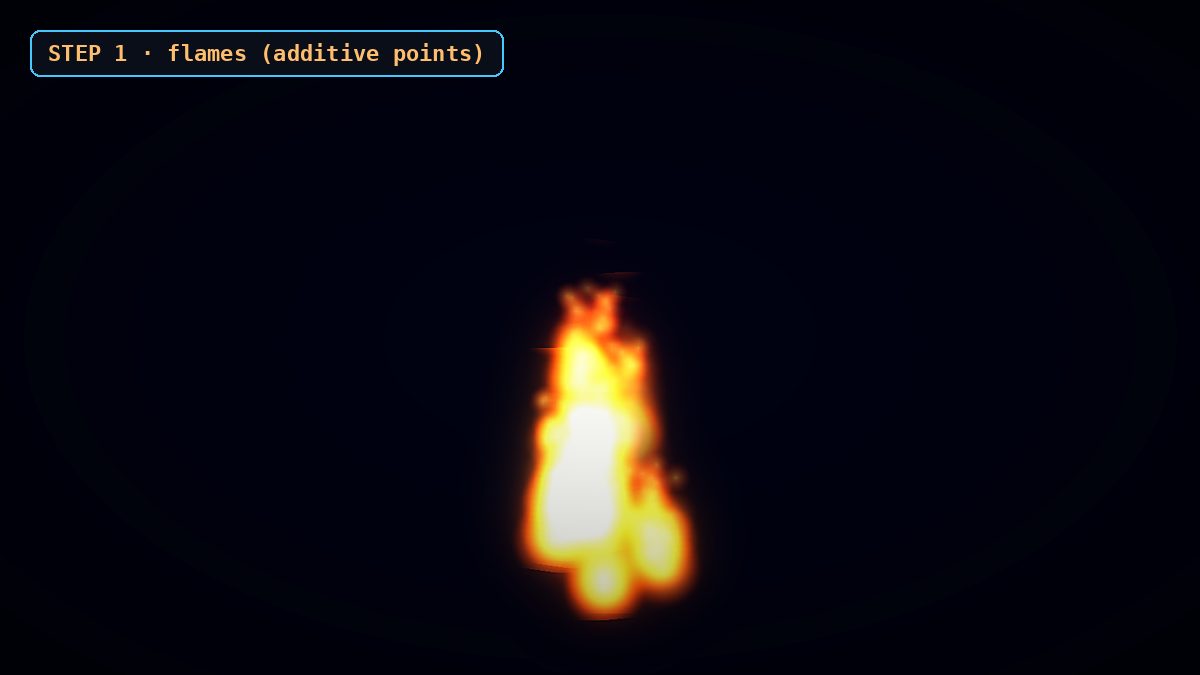
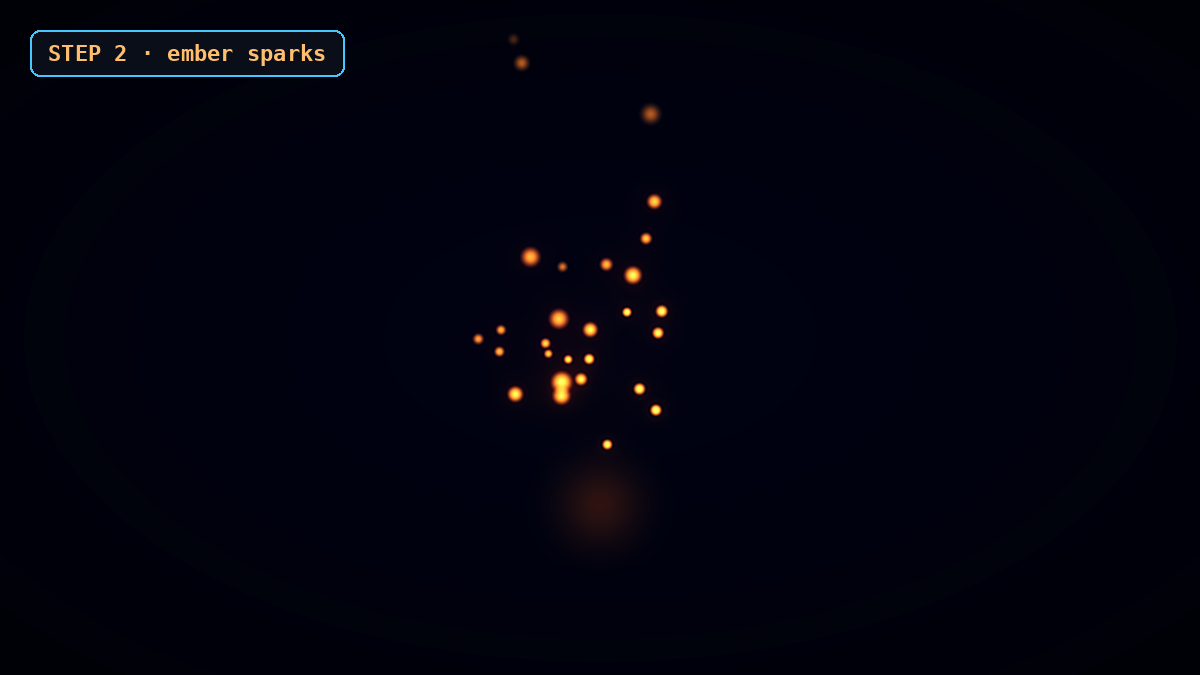
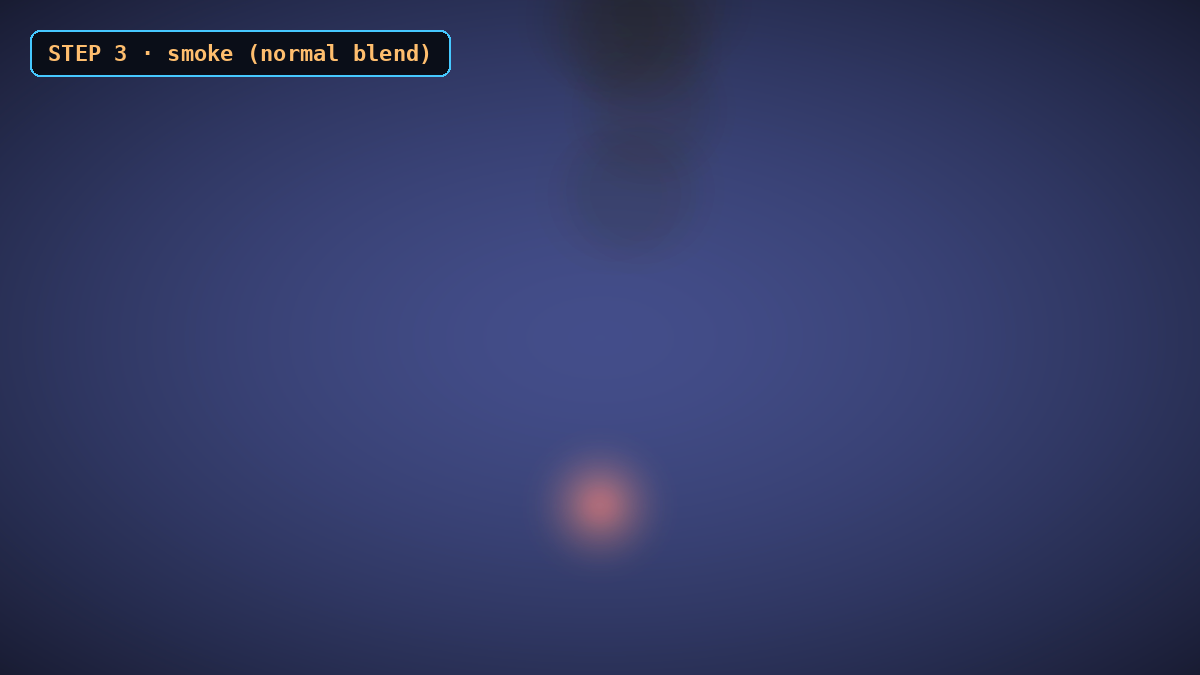
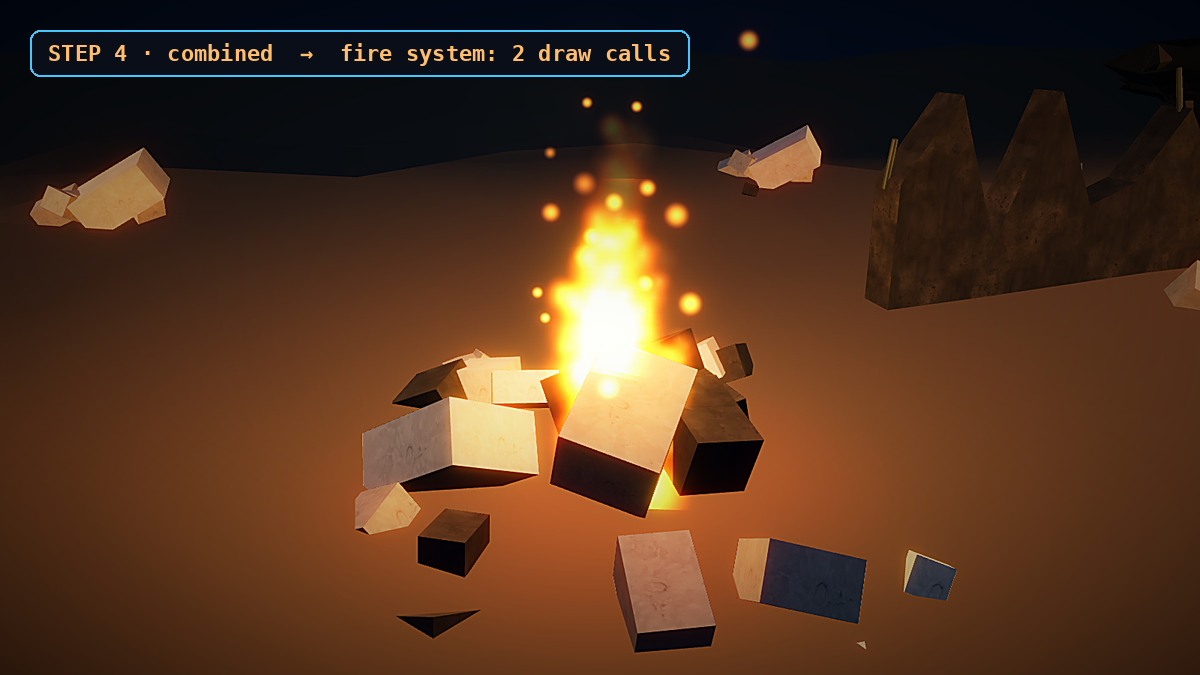
Here is each layer on its own. Flames, embers and the glow all ride in one additive draw call; the soft smoke is a second, normal-blended draw call. Put them together and the whole fire is still just two draw calls.
Flames only: the additive flame particles of one fire, animated entirely in the vertex shader.Ember sparks only: tiny bright points that rise and drift, in the same draw call as the flames.Smoke only: soft puffs in the second Points object with normal blending (brightened for visibility).Everything combined on a real rubble pile: the whole fire system is just 2 draw calls (fire + smoke).
That's the whole system. The detailed code breakdown and the full copy-paste example are below — sign in free to unlock them.
Sign in to unlock the code
This tutorial is 100% free — just sign in with Google to reveal the full code breakdown, the complete copy-paste code, and the one-click Launch. It takes one click and unlocks every free tutorial.
Code Breakdown
Here is the whole effect in plain English. Beginners: read the bold summaries. Developers: the notes after each explain the why and the performance choices. The snippets are simplified from Super Soldier Battle's module/ssb-ruin-fire.js.
1. One vertex per particle, seeds do the rest
// Simplified from Super Soldier Battle (module/ssb-ruin-fire.js)
// fires = [[x, y, z, scale], ...]   type: 0 flame, 1 ember, 2 glow, 3 smoke
function build(fires, perFire, typeOf, baseScale) {
  const n = fires.length * perFire;
  const pos = new Float32Array(n * 3), seed = new Float32Array(n * 4), info = new Float32Array(n * 2);
  let i = 0;
  for (let f = 0; f < fires.length; f++) for (let j = 0; j < perFire; j++, i++) {
    pos.set(fires[f].slice(0, 3), i * 3);                       // every particle starts at its fire
    seed.set([Math.random(), Math.random(), Math.random(), Math.random()], i * 4);
    info[i * 2] = typeOf(j);                                    // flame / ember / glow / smoke
    info[i * 2 + 1] = fires[f][3] * baseScale + f * 0.0001;     // fire scale (+ tiny fire id)
  }
  const g = new THREE.BufferGeometry();
  g.setAttribute('position', new THREE.BufferAttribute(pos, 3));
  g.setAttribute('aSeed', new THREE.BufferAttribute(seed, 4));
  g.setAttribute('aInfo', new THREE.BufferAttribute(info, 2));
  g.computeBoundingSphere();
  return g;
}

// 22 flames + 36 embers + 1 glow per fire in ONE geometry; smoke gets its own.
const flames = 22, embers = 36;
const fireGeo  = build(fires, flames + embers + 1, j => j < flames ? 0 : (j < flames + embers ? 1 : 2), 5);
const smokeGeo = build(fires, 18, () => 3, 5);
In plain English: every particle in the scene starts life at its own fire's position, and four random numbers decide how it moves. Developer note: packing flames, embers and the glow into ONE geometry is what collapses them into a single draw call. The seeds and type are written once; after creation the CPU never touches these arrays again. A tiny per-fire offset hidden in the scale (f * 0.0001) gives each fire its own flicker phase in the shader.
In plain English: each particle counts from 0 to 1 over its lifetime, then starts over from a brand-new random spot, forever. Developer note: fract(uTime / ttl + seed) gives a looping 0..1 life, and floor() of the same value counts cycles, so re-hashing the seeds with the cycle number makes every respawn start somewhere new instead of replaying the same path. Embers and smoke use the same pattern with different numbers (embers live 1.2–2.6s and sway; smoke lives 4–6.5s, drifts and grows). Because everything depends only on uTime, the CPU's per-frame work is a single uniform write.
In plain English: fires far from the camera smoothly fade out, and once they're far enough they're thrown off screen with a zero size so they cost nothing to draw. Developer note: the fade runs between two distances (uFade is 260–420 world units for the ruin fires). Beyond the far edge the point is moved outside clip space and given gl_PointSize = 0.0, so it produces zero fragments. The size scales with the projection and distance and is capped with uMaxPx so a fire right in front of the camera can't fill the screen. On the CPU, uScale is set each frame to half the drawing-buffer height, so point sizes stay consistent across screen sizes and pixel ratios.
4. A glow sprite instead of a PointLight
// vertex, GLOW branch (type 2)
float fid = fract(S) * 10000.0;            // per-fire id -> flicker phase
float flick = 0.75 + 0.15 * sin(uTime * 13.0 + fid) + 0.1 * sin(uTime * 27.3 + fid * 1.7);
vLife = 0.5; p = vec3(0.0, 0.35, 0.0); size = 4.5; vA *= 0.32 * flick;

// fragment (shared fire material): glow and embers are soft dots, flames sample the flipbook
vec2 q = gl_PointCoord - 0.5; float d = length(q);
if (vType > 1.5) { float g = smoothstep(0.5, 0.0, d); gl_FragColor = vec4(vec3(1.0, 0.47, 0.12) * g * g * vA, 1.0); return; }
if (vType > 0.5) { gl_FragColor = vec4(vec3(1.0, 0.6, 0.25) * 2.0 * smoothstep(0.5, 0.0, d) * (1.0 - vLife) * vA, 1.0); return; }
// ...flame: pick one of 16 frames from a 4x4 atlas, rotate gl_PointCoord, fade in/out with vLife
In plain English: instead of a real light, each fire gets one extra glowing dot at its base that flickers, drawn in the same pass as the flames. Developer note: in a big scene every extra PointLight makes the lit materials more expensive to render, so the campfire's light and ground glow become one additive glow sprite per fire, inside the fire draw call. The 4x4 flame atlas is painted at startup on a 256×256 canvas with radial gradients, so the module downloads no texture files. The module can optionally add a single shared flickering light near the player, but the game leaves it off.
5. Two Points objects and your own culling
const mk = (frag, blending) => new THREE.ShaderMaterial({
  uniforms: uni, vertexShader: VERT, fragmentShader: frag,
  transparent: true, depthWrite: false, blending, fog: false, toneMapped: false
});
const fire  = new THREE.Points(fireGeo,  mk(FIRE_FRAG,  THREE.AdditiveBlending));
const smoke = new THREE.Points(smokeGeo, mk(SMOKE_FRAG, THREE.NormalBlending));
fire.frustumCulled = smoke.frustumCulled = false;   // the map-wide sphere is useless; cull per fire
smoke.renderOrder = 1; fire.renderOrder = 2;
scene.add(smoke, fire);

const frustum = new THREE.Frustum(), pm = new THREE.Matrix4(), sph = new THREE.Sphere(), cp = new THREE.Vector3();
const R = 5 * 6;                                     // scale * 6
const far = 420;                                     // fully culled beyond this (o.far)
function update(dt, cam) {
  uni.uTime.value = (uni.uTime.value + Math.min(dt || 0.016, 0.1)) % 3600;
  cam.getWorldPosition(cp); uni.uCam.value.copy(cp);
  pm.multiplyMatrices(cam.projectionMatrix, cam.matrixWorldInverse);
  frustum.setFromProjectionMatrix(pm);
  let any = false;
  for (const f of fires) {
    sph.center.set(f[0], f[1] + R * 0.5, f[2]); sph.radius = R * f[3];
    if (cp.distanceToSquared(sph.center) < far * far && frustum.intersectsSphere(sph)) { any = true; break; }
  }
  fire.visible = smoke.visible = any;               // nothing on screen = 0 draw calls
}
In plain English: two particle objects (one for fire, one for smoke) share all their settings, and each frame the code quietly checks whether any fire is actually visible — if not, it hides both. Developer note: frustumCulled is turned off on purpose — one geometry spans fires all over the map, so its bounding sphere is huge and Three.js would almost never cull it. Instead a small sphere around each fire is tested against the camera frustum and range. The dt clamp and the % 3600 wrap keep the time uniform small, so a long session or a backgrounded tab doesn't break the animation. The real update() also tracks the nearest fire for the optional light, so it doesn't stop at the first visible fire.
6. Put fires on a wreck hull with a one-time raycast
// enable raycasting on the wreck meshes just for this pass
const wreckMeshes = [];
scene.traverse(o => {
  if (o.name && o.name.indexOf('v2visual_gunship_wreck') === 0 && (o.isMesh || o.isInstancedMesh)) {
    o.userData._savedRaycast = o.raycast;                 // the no-op
    o.raycast = THREE.InstancedMesh.prototype.raycast;    // the real one
    wreckMeshes.push(o);
  }
});
const ray = new THREE.Raycaster(), down = new THREE.Vector3(0, -1, 0);
function hullTopY(x, z, baseY) {
  ray.set(new THREE.Vector3(x, baseY + 60, z), down);
  for (const h of ray.intersectObjects(wreckMeshes, false)) if (isFinite(h.point.y)) return h.point.y;
  return null;
}

const wreckFires = [];
for (const w of wreckPlacements) {
  const wx = +w[0], wy = +w[1], wz = +w[2], rot = +(w[3] || 0);
  if (!isFinite(wx) || !isFinite(wy) || !isFinite(wz)) continue;   // bad data: skip
  const dx = Math.cos(rot), dz = Math.sin(rot), px = -dz, pz = dx;  // hull long + cross axes
  for (let k = 0; k < 4; k++) {
    const along = (Math.random() * 2 - 1) * 14, cross = (Math.random() * 2 - 1) * 4;
    const fx = wx + dx * along + px * cross, fz = wz + dz * along + pz * cross;
    const top = hullTopY(fx, fz, wy);
    const fy = top !== null ? top + 0.8 : wy + 5;                   // safe fallback height
    if (isFinite(fx) && isFinite(fy) && isFinite(fz)) wreckFires.push([fx, fy, fz, 0.45 + Math.random() * 0.55]);
  }
}
// restore the no-op so the ground ray is unaffected
for (const m of wreckMeshes) { m.raycast = m.userData._savedRaycast || function () {}; delete m.userData._savedRaycast; }
In plain English: to sit each flame on a wreck's hull, the game fires a ray straight down at that spot once, reads the hull height, and falls back to a safe height if the ray misses — checking every number along the way. Developer note: the wreck's visual mesh normally has raycasting disabled (a no-op raycast) so the game's ground ray ignores it; the game swaps the real raycast in for this one pass, then restores the no-op. Every value is checked with isFinite, because a NaN or huge Y once produced a fire bar across the whole screen. The wreck fires are a second instance of the same system with lighter settings (scale: 4, flames: 12, embers: 10, smoke: 4), and the ruin fires also trim their smoke, because big soft smoke sprites are the most expensive part in fill rate.
The Full Code
Copy this into a file named index.html and open it in any modern browser — or hit Launch. Three.js loads from a CDN via the import map, so it runs as-is. Twenty fires are scattered across the ground, all drawn in just two draw calls. Drag to orbit.
<!DOCTYPE html>
<html lang="en">
<head>
  <meta charset="UTF-8" />
  <meta name="viewport" content="width=device-width, initial-scale=1" />
  <title>Many Fires, Two Draw Calls</title>
  <style>
    html, body { margin: 0; height: 100%; background: #0b0d12; overflow: hidden; }
    canvas { position: absolute; inset: 0; width: 100%; height: 100%; display: block; touch-action: none; }
  </style>
</head>
<body>
  <canvas id="view"></canvas>
  <script async src="https://unpkg.com/es-module-shims@1.8.0/dist/es-module-shims.js"></script>
  <script type="importmap">
  {
    "imports": {
      "three": "https://unpkg.com/three@0.186.1/build/three.module.js",
      "three/addons/": "https://unpkg.com/three@0.186.1/examples/jsm/"
    }
  }
  </script>
  <script type="module">
import * as THREE from "three";
import { OrbitControls } from "three/addons/controls/OrbitControls.js";

// ============================================================
// SCENE / RENDERER
// ============================================================
const canvas = document.getElementById("view");
const renderer = new THREE.WebGLRenderer({ canvas, antialias: true });
renderer.setPixelRatio(Math.min(window.devicePixelRatio || 1, 2));
renderer.outputColorSpace = THREE.SRGBColorSpace;

const scene = new THREE.Scene();
scene.background = new THREE.Color(0x0b0d12);
scene.fog = new THREE.FogExp2(0x0b0d12, 0.012);

const camera = new THREE.PerspectiveCamera(55, 1, 0.1, 400);
camera.position.set(0, 10, 34);

const controls = new OrbitControls(camera, renderer.domElement);
controls.target.set(0, 2, 0);
controls.enableDamping = true;
controls.autoRotate = true;
controls.autoRotateSpeed = 0.5;

scene.add(new THREE.AmbientLight(0x33384a, 1.0));
const ground = new THREE.Mesh(
  new THREE.CircleGeometry(60, 48),
  new THREE.MeshBasicMaterial({ color: 0x15171f })
);
ground.rotation.x = -Math.PI / 2;
scene.add(ground);

// ============================================================
// FIRE SPOTS: [x, y, z, scale]. In a real game these come from
// placement data or a one-time raycast onto a surface. Here we
// scatter 20 fires across the ground so you can see the system
// draw MANY fires in just two draw calls.
// ============================================================
const fires = [];
for (let i = 0; i < 20; i++) {
  const a = Math.random() * Math.PI * 2;
  const r = 4 + Math.random() * 26;
  fires.push([Math.cos(a) * r, 0, Math.sin(a) * r, 0.7 + Math.random() * 0.8]);
}

// ============================================================
// BUILD ONE BufferGeometry: one VERTEX per particle. Every
// particle starts at its fire's origin; four random seeds plus
// a type and a per-fire scale drive all the motion in the shader.
// ============================================================
function build(perFire, typeOf, baseScale) {
  const n = fires.length * perFire;
  const pos = new Float32Array(n * 3);
  const seed = new Float32Array(n * 4);
  const info = new Float32Array(n * 2);
  let i = 0;
  for (let f = 0; f < fires.length; f++) {
    for (let j = 0; j < perFire; j++, i++) {
      pos[i * 3] = fires[f][0];
      pos[i * 3 + 1] = fires[f][1];
      pos[i * 3 + 2] = fires[f][2];
      seed[i * 4] = Math.random();
      seed[i * 4 + 1] = Math.random();
      seed[i * 4 + 2] = Math.random();
      seed[i * 4 + 3] = Math.random();
      info[i * 2] = typeOf(j);                           // 0 flame, 1 ember, 2 glow, 3 smoke
      info[i * 2 + 1] = fires[f][3] * baseScale + f * 0.0001; // fire scale (+ tiny fire id)
    }
  }
  const g = new THREE.BufferGeometry();
  g.setAttribute("position", new THREE.BufferAttribute(pos, 3));
  g.setAttribute("aSeed", new THREE.BufferAttribute(seed, 4));
  g.setAttribute("aInfo", new THREE.BufferAttribute(info, 2));
  g.computeBoundingSphere();
  return g;
}

const FLAMES = 22, EMBERS = 36;
const fireGeo = build(FLAMES + EMBERS + 1,
  j => (j < FLAMES ? 0 : (j < FLAMES + EMBERS ? 1 : 2)), 5);
const smokeGeo = build(18, () => 3, 5);

// ============================================================
// SHARED UNIFORMS: one object updates BOTH draw calls.
// ============================================================
const uni = {
  uTime: { value: 0 },
  uCam: { value: new THREE.Vector3() },
  uFade: { value: new THREE.Vector2(60, 180) }, // fade from 60 -> 180 world units
  uScale: { value: 300 },                        // half the drawing-buffer height
  uMaxPx: { value: 90 }                          // cap so a near fire can't fill the screen
};

// ============================================================
// VERTEX SHADER: every particle is simulated here from uTime
// and its seeds. fract() loops each lifetime forever; floor()
// counts cycles so the seed re-hashes and respawns elsewhere.
// Far fires are faded, then hard-culled with a zero point size.
// ============================================================
const VERT = `
uniform float uTime; uniform vec3 uCam; uniform vec2 uFade;
uniform float uScale, uMaxPx;
attribute vec4 aSeed; attribute vec2 aInfo;
varying float vLife; varying float vA; varying float vType;
float h(float n){ return fract(sin(n) * 43758.5453); }
void main() {
  vType = aInfo.x;
  float S = aInfo.y;               // fire scale
  vec3 org = position;             // fire origin
  float fade = 1.0 - smoothstep(uFade.x, uFade.y, distance(org, uCam));
  if (fade <= 0.0) { gl_Position = vec4(2.0, 2.0, 2.0, 1.0); gl_PointSize = 0.0; return; }
  vA = fade;
  vec3 p; float size;
  if (vType < 0.5) {               // FLAME: rises, drifts inward, shrinks
    float ttl = mix(0.7, 1.2, aSeed.x);
    float c = uTime / ttl + aSeed.y;
    float cyc = floor(c); vLife = fract(c);
    float r1 = h(aSeed.z * 91.0 + cyc), r2 = h(aSeed.w * 57.0 + cyc * 1.3), r3 = h(aSeed.x * 33.0 + cyc * 0.7);
    float r = r1 * 0.35, a = r2 * 6.2832;
    vec3 p0 = vec3(cos(a) * r, mix(0.12, 0.26, r3), sin(a) * r);
    vec3 v = vec3(-p0.x * 0.4, mix(0.8, 1.4, r3), -p0.z * 0.4);
    p = p0 + v * vLife * ttl;
    size = mix(1.4, 3.2, r1) * (1.0 - vLife * 0.5);
  } else if (vType < 1.5) {        // EMBER: lives longer, sways
    float ttl = mix(1.2, 2.6, aSeed.x);
    float c = uTime / ttl + aSeed.y;
    float cyc = floor(c); vLife = fract(c);
    float r1 = h(aSeed.z * 71.0 + cyc), r2 = h(aSeed.w * 41.0 + cyc * 1.7);
    float a = r2 * 6.2832, r = r1 * 0.25;
    p = vec3(cos(a) * r, 0.15, sin(a) * r);
    p.y += mix(1.0, 2.2, r1) * vLife;
    p.x += sin(p.y * 4.0 + a * 10.0) * 0.12;
    p.z += cos(p.y * 4.0 + a * 10.0) * 0.12;
    size = mix(0.4, 0.9, r1) * (1.0 - vLife);
  } else if (vType < 2.5) {        // GLOW: steady sprite that flickers (no PointLight)
    float fid = fract(S) * 10000.0;
    float flick = 0.75 + 0.15 * sin(uTime * 13.0 + fid) + 0.1 * sin(uTime * 27.3 + fid * 1.7);
    vLife = 0.5; p = vec3(0.0, 0.35, 0.0); size = 4.5; vA *= 0.32 * flick;
  } else {                         // SMOKE: slow, drifts, wobbles, grows
    float ttl = mix(4.0, 6.5, aSeed.x);
    float c = uTime / ttl + aSeed.y;
    float cyc = floor(c); vLife = fract(c);
    float r1 = h(aSeed.z * 61.0 + cyc), r2 = h(aSeed.w * 23.0 + cyc * 1.9);
    float a = r2 * 6.2832;
    p = vec3(cos(a) * 0.2, 0.3, sin(a) * 0.2);
    p.y += mix(2.5, 4.5, r1) * vLife;
    p.x += sin(vLife * 6.2832 + a) * 0.8 + (r1 - 0.5) * vLife * 1.2;
    p.z += cos(vLife * 6.2832 + a) * 0.8;
    size = mix(3.0, 6.0, r1) * (0.6 + vLife * 1.1);
    vA *= smoothstep(0.0, 0.2, vLife) * (1.0 - smoothstep(0.55, 1.0, vLife)) * 0.5;
  }
  vec4 mv = modelViewMatrix * vec4(org + p * S, 1.0);
  gl_PointSize = min(size * S * uScale * projectionMatrix[1][1] / -mv.z, uMaxPx);
  gl_Position = projectionMatrix * mv;
}
`;

// ============================================================
// FRAGMENT SHADERS: glow + embers are soft dots; flames and
// smoke are soft radial blobs. (The game samples a 4x4 flame
// atlas painted at startup; here a soft blob keeps it short.)
// ============================================================
const FIRE_FRAG = `
precision mediump float;
varying float vLife; varying float vA; varying float vType;
void main() {
  vec2 q = gl_PointCoord - 0.5; float d = length(q);
  if (vType > 1.5) {               // glow
    float g = smoothstep(0.5, 0.0, d);
    gl_FragColor = vec4(vec3(1.0, 0.47, 0.12) * g * g * vA, 1.0); return;
  }
  if (vType > 0.5) {               // ember
    gl_FragColor = vec4(vec3(1.0, 0.6, 0.25) * 2.0 * smoothstep(0.5, 0.0, d) * (1.0 - vLife) * vA, 1.0); return;
  }
  // flame: hot core fading to orange, soft edge, fade in/out over life
  float core = smoothstep(0.5, 0.0, d);
  vec3 col = mix(vec3(1.0, 0.35, 0.05), vec3(1.0, 0.85, 0.4), core);
  float life = smoothstep(0.0, 0.15, vLife) * (1.0 - smoothstep(0.6, 1.0, vLife));
  gl_FragColor = vec4(col * core * life * vA * 1.6, 1.0);
}
`;

const SMOKE_FRAG = `
precision mediump float;
varying float vA;
void main() {
  vec2 q = gl_PointCoord - 0.5; float d = length(q);
  float a = smoothstep(0.5, 0.0, d) * vA;
  gl_FragColor = vec4(vec3(0.12, 0.12, 0.13), a);
}
`;

// ============================================================
// TWO Points OBJECTS, TWO DRAW CALLS. Both share `uni`.
// Smoke renders first (normal blend); fire on top (additive).
// frustumCulled = false because one geometry spans the whole
// map; we cull per fire ourselves in update().
// ============================================================
const mk = (frag, blending) => new THREE.ShaderMaterial({
  uniforms: uni, vertexShader: VERT, fragmentShader: frag,
  transparent: true, depthWrite: false, blending, fog: false, toneMapped: false
});
const fire = new THREE.Points(fireGeo, mk(FIRE_FRAG, THREE.AdditiveBlending));
const smoke = new THREE.Points(smokeGeo, mk(SMOKE_FRAG, THREE.NormalBlending));
fire.frustumCulled = smoke.frustumCulled = false;
smoke.renderOrder = 1; fire.renderOrder = 2;
scene.add(smoke, fire);

// ============================================================
// UPDATE: the ONLY per-frame CPU work. Advance time, copy the
// camera position, and test a small sphere around each fire
// against the frustum + range. Hide both objects when none
// pass, so off-screen fires cost zero draw calls.
// ============================================================
const frustum = new THREE.Frustum(), pm = new THREE.Matrix4();
const sph = new THREE.Sphere(), cp = new THREE.Vector3();
const R = 5 * 6;          // scale * 6
const far = uni.uFade.value.y; // fully gone beyond the fade end
function update(dt, cam) {
  uni.uTime.value = (uni.uTime.value + Math.min(dt || 0.016, 0.1)) % 3600;
  cam.getWorldPosition(cp); uni.uCam.value.copy(cp);
  pm.multiplyMatrices(cam.projectionMatrix, cam.matrixWorldInverse);
  frustum.setFromProjectionMatrix(pm);
  let any = false;
  for (const f of fires) {
    sph.center.set(f[0], f[1] + R * 0.5, f[2]); sph.radius = R * f[3];
    if (cp.distanceToSquared(sph.center) < far * far && frustum.intersectsSphere(sph)) { any = true; break; }
  }
  fire.visible = smoke.visible = any;
}

// ============================================================
// RENDER LOOP + RESIZE
// ============================================================
const clock = new THREE.Clock();
function frame() {
  requestAnimationFrame(frame);
  const dt = clock.getDelta();
  uni.uScale.value = renderer.domElement.height * 0.5; // consistent point size across DPRs
  update(dt, camera);
  controls.update();
  renderer.render(scene, camera);
}
function resize() {
  const w = canvas.clientWidth || 1, h = canvas.clientHeight || 1;
  renderer.setSize(w, h, false);
  camera.aspect = w / h;
  camera.updateProjectionMatrix();
}
resize();
addEventListener("resize", resize);
frame();
  </script>
</body>
</html>
How To Use It In Your Game
Collect your fire spots as [x, y, z, scale]. Use placement data, or raycast onto a surface once at load time, and guard everything with isFinite.
Build one geometry for flames, embers and glow, and one for smoke, with one vertex per particle and random seeds.
Animate everything in the vertex shader from uTime, and loop lifetimes with fract().
Fade and cull by distance in the shader, and use a glow sprite instead of PointLights.
Turn off frustumCulled, run your own per-fire frustum test, and hide both objects when nothing is visible.
Call update(dt, camera) every frame with the camera you render from.
SEE THESE FIRES IN A REAL GAME
This fire system ships in Super Soldier Battle's burning ruins and crashed gunship wrecks. Read the dev log on the fires update to see the gameplay side of the same feature.